
Click on a category on the left to see FAQs on that topic.
The sponsor is requiring that the proposed personnel effort be shown in man-hours. How do I do this?
MIT budgets for personnel using man-months or percent effort, not man-hours. If the sponsor’s solicitation requires man-hours, include an estimated man-hours conversion rate with the following statement:
"MIT’s accounting system does not support estimating, accumulating, billing and reporting personnel costs on a man-hour basis. Estimated man-hour conversion information is provided for sponsor proposal evaluation purposes only. If an award is made, costs will be accumulated and reported on a man-month basis."
Updated January 27, 2025
What are the roles in project monitoring? (Who does what?)
This RAII Accountability Matrix (November 2012/2020) shows the roles and responsibilities for each phase of a project.
What do I need to do in Kuali Coeus when on-boarding a new hire, or when someone leaves MIT?
When your DLCI has a new hire, an important part of their on-boarding is providing access to MIT systems. This includes assigning roles in Kuali Coeus (KC) for proposal and awards. Similarly, when an individual leaves the DLCI, their KC roles and abilities for your DLCI should be removed. For some of these tasks, adding and removing access to KC this is accomplished through the Roles Database by the department's Primary Financial Authorizer or by emailing business-help@mit.edu.
For DLCIs with sponsored awards, there is functionality in KC that determines the recipients of notifications related to awards. Notifications related to training requirements for personnel charged to sponsored projects, requests for approval of Human Subject protocols; receive SAP 001 notifications for sponsored projects, outstanding Conflict of Interest disclosure notifications, late reports, and more. For these KC updates, you need to ask Research Administration Support [email]. We can help you review and update the notification recipients for your unit.
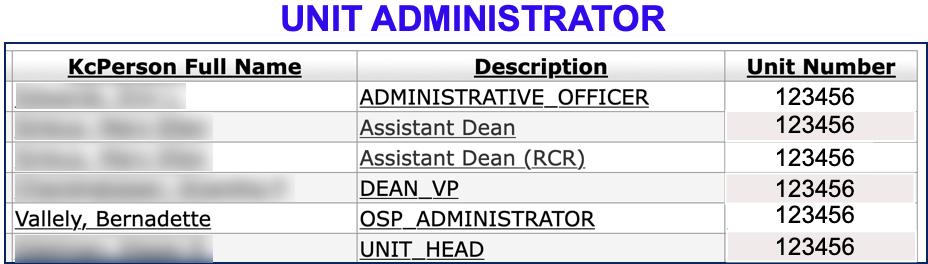
The personnel listed in your KC Unit Administrator Table determines who gets the notifications noted above.
KC Unit Administrator Table and SAP -001 Reports
The daily feed from KC to SAP generates the SAP 001 Report.
- There are only two (2) recipients of the SAP 001 Report: “Addressee” and “Supervisor.”
- The Supervisor is the PI on the KC Award
- The Addressee in SAP is the Administrative Officer in KC
- The exception to this is when there is someone named Other Individual to Notify; then they receive the SAP 001 rather than the AO.
There is a different place in KC where RA Support can update approvers for KC proposals. These are the KC proposal approval maps called KC People Flow.
If you are unsure of whom to contact when it comes to accessing and updating your staff’s access to KC, here is a quick list:
Type |
Description |
Contact |
|---|---|---|
KC Roles |
Proposal Create, View Award, View Development Proposals, etc. |
business-help@mit.edu or your department's Financial Primary Authorizer |
Unit Administrators |
Notifications triggered by KC Awards |
|
KC People Flow |
Proposal approvals |
What is a “WBS element”?
A WBS (Work Breakdown Structure) element is a cost objective in SAP that collects expenses and revenues related to sponsored projects. WBS elements are both research and fund accounts. Projects often include several WBS elements forming a WBS hierarchy.
What is Kuali Coeus?
Kuali Coeus is an electronic system used to standardize research administration processes. Modeled after Coeus, which was developed here at MIT, it is a cradle-to-grave award management system that is designed to assist the research community in proposal development, tracking of submitted proposals, and award acquisition and management.
Named after the Greek Titan of Intelligence, the original Coeus application was one of the first cradle-to-grave award management systems in the nation. The purpose of the system is to standardize processes with pre- and post-award modules designed to assist the research community in proposal development, log and track submitted proposals, and increase the efficiency of award acquisition and management for all participants contributing to the research enterprise with the post award modules.
When is my next report due?
You can check on reporting requirements in the Kuali Coeus Award module.
Why did I get a reminder to take Human Subjects Training?
A recent update to COUHES Connect provides your PI with a human subjects training tracking tool that utilizes Connect protocols, sponsored awards, and MIT Personnel expenses to monitor personnel that could require training (either missing or expired). If your PI or supervisor confirms that you do require training, make sure you take the correct course:
- Login to CITI and take a look at your completed courses in the “My Records” menu.
- If you don’t have a completed Basic Course in Human Subjects Research, then you need to select one of the courses listed in Question 1 - for ‘new trainees’ – these are the basic level courses.
- Do NOT take a refresher course (question 2) – a refresher is only valid if you have a completed basic course. You’ll need a refresher when your basic course expires three years after completion.
Read more about Human Subjects Training on the COUHES website.
Why don't my Kuali Coeus Obligated Total and SAP Authorized Total match?
The Authorized Total in SAP most closely aligns with the Obligated Distributable Total in KC. When these two amounts differ, there are several common potential causes:
- Recent updates to totals on an award may not yet have fed from KC to SAP.
- The feed is run between 3 and 4 pm each day. If the update was after the daily feed, it will not be reflected in SAP until the following afternoon.
- If the award/account is part of a structure, having a child award in Hold status in KC (and thus not yet in SAP) will cause the SAP authorized total of the account parent(s) not to match the KC Obligated Distributable totals.
- This will self-correct in time once the child award taken out of Hold status and feeds to SAP
- If it is a newly set up award that had cost sharing included in the proposal, the KC Obligated Distributable may not match the SAP Authorized total.
- Updates in KC with an Award-phase cost sharing template and, if needed, set up of a Cost Sharing Child account should resolve the discrepancy
What should I do if it doesn’t seem to be one of these scenarios causing the problem with the totals?
- Reach out to your RAS Contract Administrator, or, if you prefer, open an OST ticket. We will work together in RAS to identify the problem.